
Better Writing
Private English rewriting & coaching
Rewrite English for grammar, clarity, and tone on iPhone and iPad with an on-device model. Once a compatible model is ready, editing works offline without sending your writing to a Studio AM server.

On the App Store this is listed as Rewrite Text & Grammar Checker.
Rewrite English without handing it to an AI server
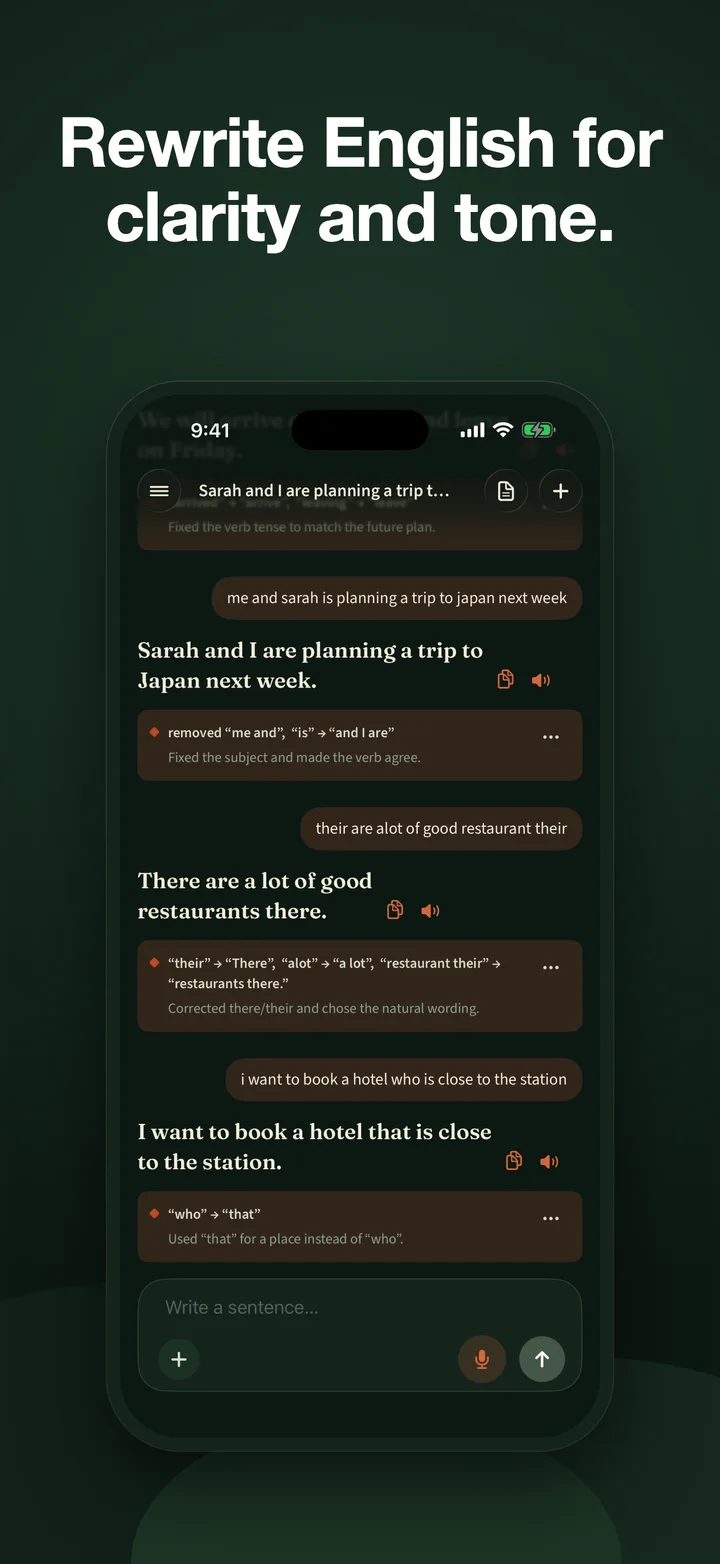
Private emails, applications, and messages can be exactly the text you do not want copied into a remote writing service. Better Writing keeps the editing path on your iPhone or iPad. Type or paste English, inspect the real word-level changes, and decide whether the suggestion still means what you intended.
The app uses Apple’s built-in model when that runtime is available. On other supported hardware, it can offer a downloadable local model. Once a compatible model is ready, editing works offline. There is no Studio AM account or writing server.
What it does
- Rewrite and inspect. Improve grammar, spelling, punctuation, clarity, word choice, and tone, then see the exact words removed and added.
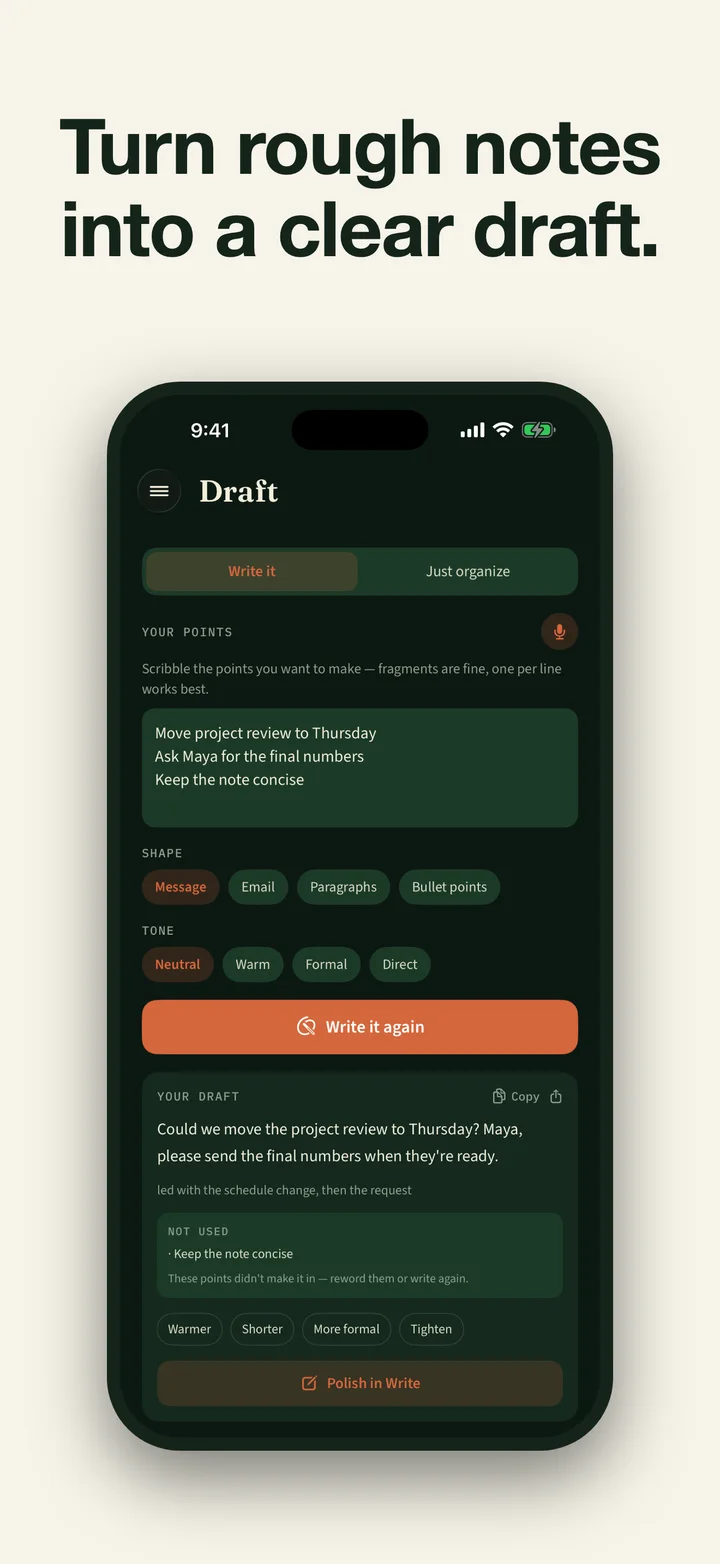
- Refine the result. Try Shorter, More formal, Simpler, More natural, or Elevate without hiding the original.
- Draft from your notes. Turn rough points into a message, email, clear paragraphs, or an outline. The app marks which supplied points it used; review the result before sending it.
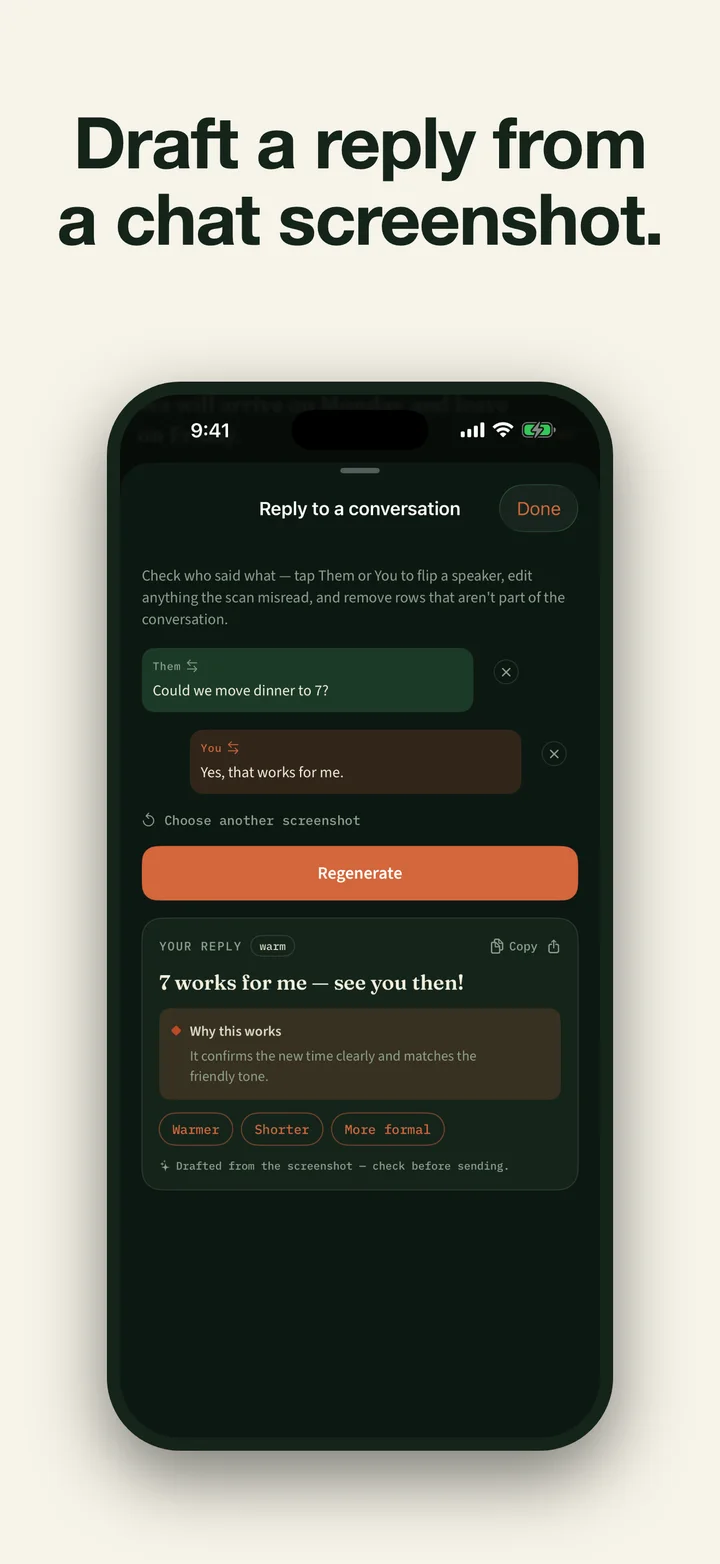
- Reply from a screenshot. Share a conversation screenshot, confirm the locally recognized transcript, and draft the next English reply.
- Edit a whole message. Treat a longer message as one unit instead of rewriting each sentence in isolation.
- Learn from recurring patterns. Review mistake categories, a weekly plan, deterministic grammar rules, and short targeted practice built from your own edits.
- Ask your writing. Ask about your progress or past rewrites. Answers are constrained to your saved history; if the app declines, a web search opens only after you tap it.
- Read it aloud. The system voice highlights words as it reads, including saved results in archive mode. Pro can also download an optional natural voice of about 320 MB that runs on-device; natural-voice playback does not highlight words yet.
- Reach it from elsewhere. Use the Share extension to save selected text or a conversation screenshot locally, then open Better Writing to continue. App Shortcuts, an Improve Clipboard widget, and the daily grammar-tip widget offer more entry points. The main app checks access again before fresh work.
- Keep control. App Lock uses the device’s authentication result. Optional private iCloud sync for saved writing and study progress is off by default and uses a database Studio AM cannot read.
AI suggestions can still be wrong or change meaning. Better Writing’s checks and narrow task reduce that risk; they do not remove the need to review important text.
Subscription and archive access
Better Writing has no permanent free tier for new writing work. Eligible new subscribers may receive a 3-day trial on either the monthly or yearly plan. Apple decides eligibility and shows the current local price and renewal terms before purchase. Prices can change.
The earlier lifetime product is retired from sale but remains restore-only for verified owners. If active access ends, the app does not hold prior writing hostage: saved sessions remain readable, searchable, copyable, playable with the system voice, and individually deletable. Both export actions remain available. The readable Markdown file contains saved sessions, pending drafts, and distinct source notes such as the notes behind a saved Draft. The complete JSON archive contains all app-owned writing and state, including pending handoffs. Creating or continuing edits, drafts, replies, coaching, practice, reminders, model work, natural-voice playback, and other fresh writing features stays locked until access is active again.
Local processing, with explicit network boundaries
Depending on the hardware, Better Writing may use Apple’s built-in model or offer a one-time local download: a lighter model of about 0.9 GB on supported devices with at least 3.5 GB of physical memory, or an enhanced model of about 2.6 GB on devices with at least 5.5 GB. Devices below the local-model memory floor need Apple’s compatible built-in runtime to perform editing. Compatibility is based on the active model runtime and device memory, not an iPhone-generation promise.
A connection may be used for the first model or optional natural-voice download, StoreKit plans and purchase or restore, optional private iCloud sync for saved writing and study progress, and links you choose to open. If Ask Your Writing cannot answer from saved history, it offers a DuckDuckGo search that sends the exact question only after you tap Search the web. User-directed exports and Share actions go only to the destination you choose.
Better Writing keeps anonymous aggregate funnel and model-quality counters locally on the device. They contain no writing or identifier and are never transmitted automatically. There are no ads, third-party analytics, tracking, or Studio AM AI-processing logs.
Requirements
Better Writing requires iOS 26 or iPadOS 26 or later. It edits English text; the interface is localized in several languages, but corrections, explanations, drafts, and replies remain English. Model and feature availability depend on the device and whether compatible model setup has finished.
Common questions
Better Writing is an iPhone and iPad app for rewriting English for grammar, clarity, word choice, and tone. Editing runs on an Apple or downloaded on-device model; after compatible model setup, it works offline and no Studio AM AI server processes the writing. There is no permanent free creation tier. Eligible new subscribers may receive a 3-day trial on the monthly or yearly plan; Apple shows the current local price and renewal terms before purchase. The retired lifetime purchase is restore-only. If access ends, previously saved sessions remain readable, searchable, copyable, individually deletable, and exportable as readable Markdown plus a complete JSON archive. Both exports remain available without active access. Optional private iCloud sync for saved writing and study progress is off by default.
Does Better Writing send my text to an AI server?
No. Editing, screenshot text recognition, coaching, and Ask Your Writing run on the device. Better Writing has no Studio AM account or writing server, and no analytics or writing content is transmitted to Studio AM. Saved writing and study progress stay local unless you enable optional private iCloud sync. An export, Share action, or declined-question web search leaves only after you explicitly choose it.
Is Better Writing free? How much does it cost?
There is no permanent free creation tier. Eligible new subscribers may receive a 3-day trial on either the monthly or yearly plan. Apple shows eligibility, the current local price, and renewal terms before purchase. Prices can change. The earlier lifetime product is no longer sold, but verified owners retain Pro through Restore purchase.
What happens to my writing if a subscription ends?
Previously saved sessions remain readable, searchable, copyable, playable with the system voice, and individually deletable. Both exports remain available without active access: readable Markdown contains saved writing, pending drafts, and distinct source notes, while the complete JSON archive contains all app-owned writing and state. Creating or continuing edits, drafts, replies, coaching, practice, reminders, model work, natural-voice playback, and other fresh writing features requires active access or a restored lifetime entitlement.
What can it write or improve?
It can rewrite a sentence, paragraph, or whole message; refine a result as Shorter, More formal, Simpler, or More natural; organize user-supplied notes into a draft; and draft a reply from a confirmed screenshot transcript. Suggestions are AI-generated and can be wrong, so review important text before using it.
Can I use it from other apps?
Yes. With verified active access, the Share extension can save selected text or a conversation screenshot locally for the main app, where access is checked again before editing or reply drafting. App Shortcuts can improve supplied text or the clipboard, and Home Screen and Lock Screen widgets open a daily grammar tip or the Improve Clipboard flow. All fresh work still requires verified Pro access.
Do I need Apple Intelligence?
Not necessarily. Better Writing uses Apple’s built-in on-device model when it is available. Other supported devices with enough physical memory can use a downloadable on-device model. Better Writing requires iOS 26 or iPadOS 26 or later, and model availability depends on the device.